Pages

Showing posts with label mozilla. Show all posts

Friday, July 29, 2016

Mozilla inside Mozilla

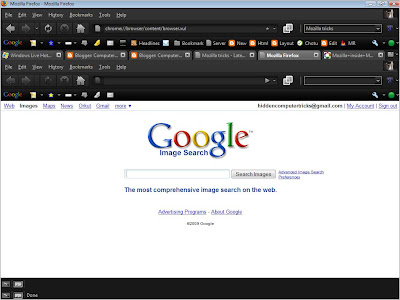
Mozilla inside Mozilla

Copy and paste the following code into your address bar to have a Firefox window inside the same window:
chrome://browser/content/browser.xul
Read More..

Thursday, April 28, 2016

Use Tabs in Windows Explorer like in mozilla Firefox

Tabs have made the way of surfing the Internet a lot easier. Using tabs in the browsers have eased up the trouble faced when switching between all the windows opened. Tabs are really the need of today that prevents from cluttering the desktop with lots of windows.

Using Tabs in the internet browsers like Firefox, Opera, IE7 and Chrome etc have made me feel the need of tabs in the Windows Explorer as well and I think there are many others like me who can’t live without tabbed browsing in the explorer.

Here is a way with which we can add tabs to the Windows Explorer, for example we can create one tab that contains all Windows Explorer folders, one for Internet and one for some other application.

Method 1:
QT TabBar
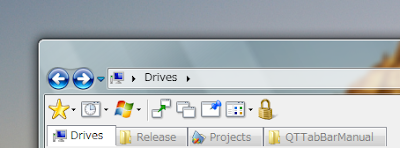
tabs for Windows Explorer
QTTabBar is an Add-In that gives Tab Browsing Feature to your Explorer. Just download and run this tool, and after that the computer needs to be restarted and you need to activate the toolbar in the View -> Toolbars menu.
Now every time you click on a new folder, it will be opened in a new tab. isn’t it cool?
Download QT TabBar

Method 2:
Window Tabifier

tabs for Windows Explorer
This program allows us to host several open Windows in one parent window so that you can easily access and navigate between them, as well as clean up space in the taskbar. This will allow us to group similar Windows together, easily navigate between them and clean up space in the taskbar.
Download Window Tabifier
Read More..

Monday, March 14, 2016

Make Mozilla Firefox load websites faster

Speedup Mozilla Firefox
If you think that your firefox is slow you can try the following tweak to fasten it.

Note:- Try this only if you are an expert.
  • Type “about:config” into the address bar and hit enter.
  • A warning sign will appear, click continue.
  • Scroll to the entry- "network.http.pipelining" - Change the value to "True" by double-clicking it.
  • Scroll to the entry- "network.http.proxy.pipelining" - Change the value to "True" by double-clicking it.
  • Scroll to the entry- "network.http.pipelining.maxrequests" - Change the value to "8" by double-clicking it. Not more than 8, because 8 is the max value allowed.
  • Now, right-click anywhere and select New >> Integer., name it “nglayout.initialpaint.delay” and set its value to “0?. This value is the amount of time the browser waits before it acts on information it receives.
Now you might feel the difference.
Read More..