Pages

Showing posts with label password. Show all posts

Wednesday, January 25, 2017

You can change your Windows Password if forget the current password

passw


1st step: go to run then type this code lusrmgr.msc and then enter.
computer tricks


2nd step: open a new window then click users folder 


3rd step: The you can see your windows username 


4th step: follow my image instruction


Read More..

Wednesday, January 4, 2017

How to hack BIOS password in Desktop and Laptop

Bios password Hack
The following steps to hack BIOS password work absolutely fine for a Desktop and are the easiest of all.
Steps:
  • Shut down the computer and take out all the plugs connected to electricity.
  • Open up the CPU cabinet and locate the CMOS battery on the motherboard (it will be a silver circular battery just like a button cell).
  • Remove the battery and keep it out for some 2-3 minutes as this will flush out the CMOS memory which stores the BIOS password and all other configurations.
  • Now place the battery back and start the computer normally.

Steps for Laptop:
  • Open up the BIOS at the time of booting.
  • There are some backdoor passwords which the manufacturing company had set that will be accepted by the BIOS. You will just need to know the make of your BIOS.Try out the passwords from these lists.
List of Award BIOS backdoor passwords:
  • BIOSTAR, AWARD_SW, AWARD SW, AWARD PW, CONDO, LKWPETER, J262, 01322222
  • List of AMI BIOS backdoor passwords:
  • AMI, AAAMMMIII, BIOS, PASSWORD, A.M.I., CONDO
  • List of PHOENIX BIOS backdoor passwords:
  • phoenix, PHOENIX, CMOS, BIOS
you can also try this utility CmosPwd 4.8

Note: Read Disclaimer before use.
Read More..

Thursday, December 22, 2016

PC user does not know the password changed despite his previous password WITH VIDEO TUTORIAL


Follow my image instruction:

1
2

3

4

5

6

7


 if you have facing any problems then watch this videos


Read More..

Wednesday, October 5, 2016

Password protect internet explorer8 Browser

Below are the steps to password protect Windows IE8 without any software.
  1. Open Internet Explorer.
  2. Select Tools >> Internet options.
  3. Click on content tab.
  4. Under Content Adviser, Click Enable.
  5. A Content adviser window pops up, you need to set admin password.
  6. Click on General tab on the new window.
  7. Click on create password
  8. Type-in the password and write a password hint to recover the password in case you forget your password.
  9. Click OK twice.
  10. Now, Whenever you open a site you will have to enter the password to gain access.
Read More..

Tuesday, March 8, 2016

how to recover your windows password

buddy i am going to show you how to recover your windows password.

1st step=connect a pendrive/memory card on computer.

2nd step=follow my image instruction


                                                   go to my computer
                                               

                             click on open control panel
                                                

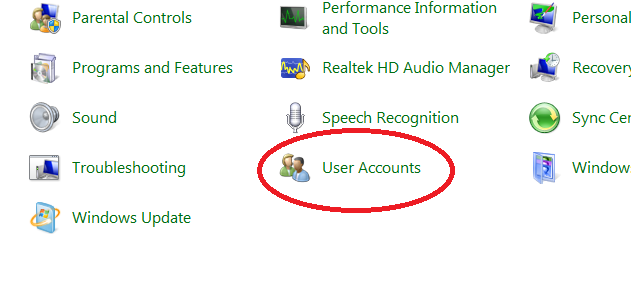
                                                           clck on user account

                                       click on crate a password reset disk

                                           here is put your current password
                                                       

wait until finished progres


click finish
 
how to use this tricks and break windows password

 1st step= restart your computer

2nd step= for test put a wrong password

3rd step=connect your memory card or pendrive where you install recovery file

4th step= put you wrong password  and enter.windows says wrong password ..and you can see reset password option.


5th step=after clickin reset option if you are connect your memory card/pendrive then open a new window.

6th step=click next and enter a new password then finish


  if you can understand then you can watch this video

Read More..